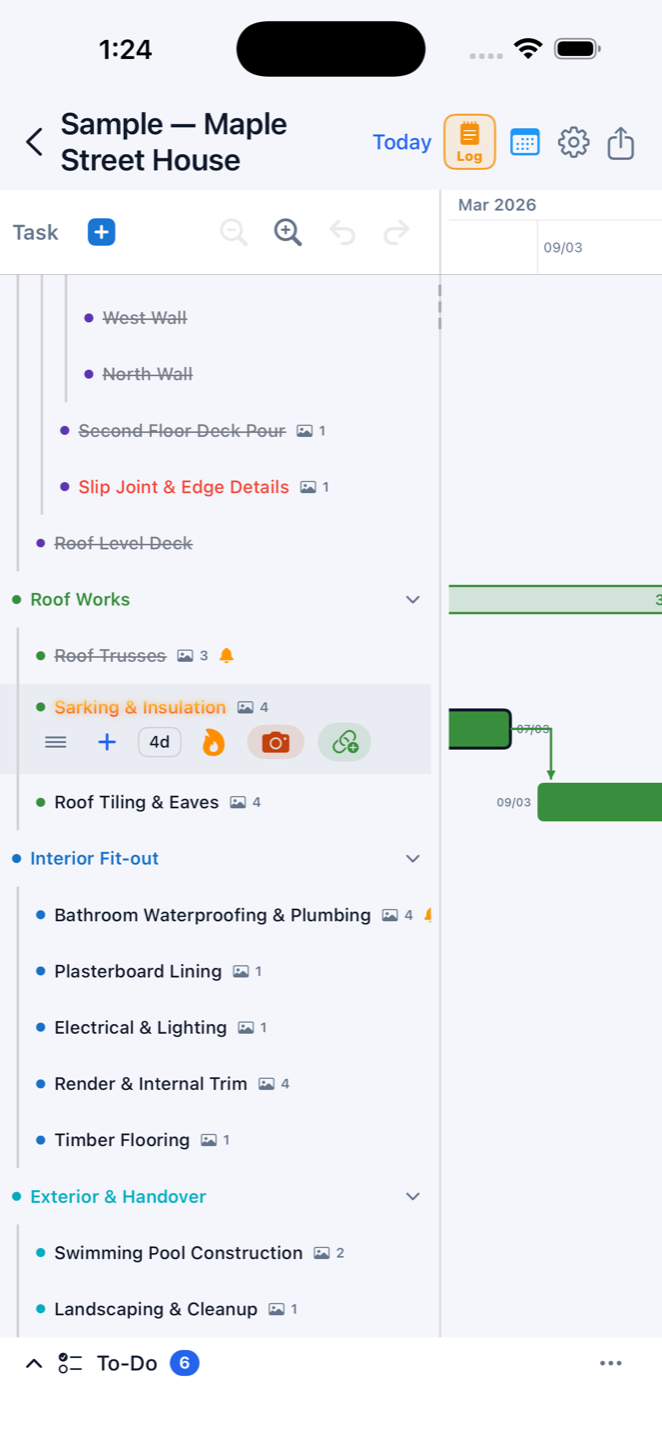
On a real build the schedule changes every week — a wet Monday, a late frame delivery, a subbie who can't start until Thursday. Construction Gantt is a construction scheduling app for iPhone, iPad and Mac that treats change as normal: link your tasks once, and when one moves, everything after it reschedules automatically, skipping weekends and the public holidays for your country and state.
Plan a whole house build in an afternoon
Break the job down the way you actually build: site works, slab, frame, roof, lock-up, fit-out — with sub-tasks nested up to five levels. Parent stages summarise their children's dates automatically, and status rolls up on its own: if waterproofing runs late, the whole wet-areas stage shows late; tick the last task and the stage completes. When the job is done, save it as a template and start the next knockdown rebuild or renovation from it — the new job schedules itself from its start date.
Run it from the site, not the site office
Everything is sized for a thumb on a phone. Tap a task and six quick buttons appear: drag, add sub-task, a duration stepper that re-plans the whole chain, status, camera and link. Long-press to reorder or nest. Fifty steps of undo mean no change is scary. And because the app is offline-first, a black spot on site never stops you — changes save on the device instantly and sync when you are back in coverage.
Made for builders, subbies and owner-builders
If you run residential jobs — new builds, extensions, renovations — this is a building schedule app sized for your crew, not enterprise software with a training course. Owner-builders planning their first build get the same automatic rescheduling the pros use — from $2.99/mo, with unlimited projects and tasks, cancel anytime.