Sharing & Settings
Sharing & Settings
Tune each project to how you actually work, export clean reports, and back the whole thing up.
PDF & printWork week & holidays.zip backupStorage & subscription
Tune each project to how you actually work, export clean reports, and back the whole thing up.
An app that traps your data isn't a tool, it's a liability. Construction Gantt exports everything the people around a build actually ask for: the Gantt chart as a PDF or print-out (task colours kept, auto-converted to a light theme for paper), the site diary as a date-range PDF, the attendance report as a printable timesheet, and photos multi-selected, shared or saved back to the camera roll.
Export any project as a single .zip — with or without its photos and videos — and keep it wherever you like. New phone? Deleted something you shouldn't have? Restore from the zip and the tasks, photos, videos, comments and likes all come back. The same file works as a handover: share the data pack and another user imports the project into their own app.
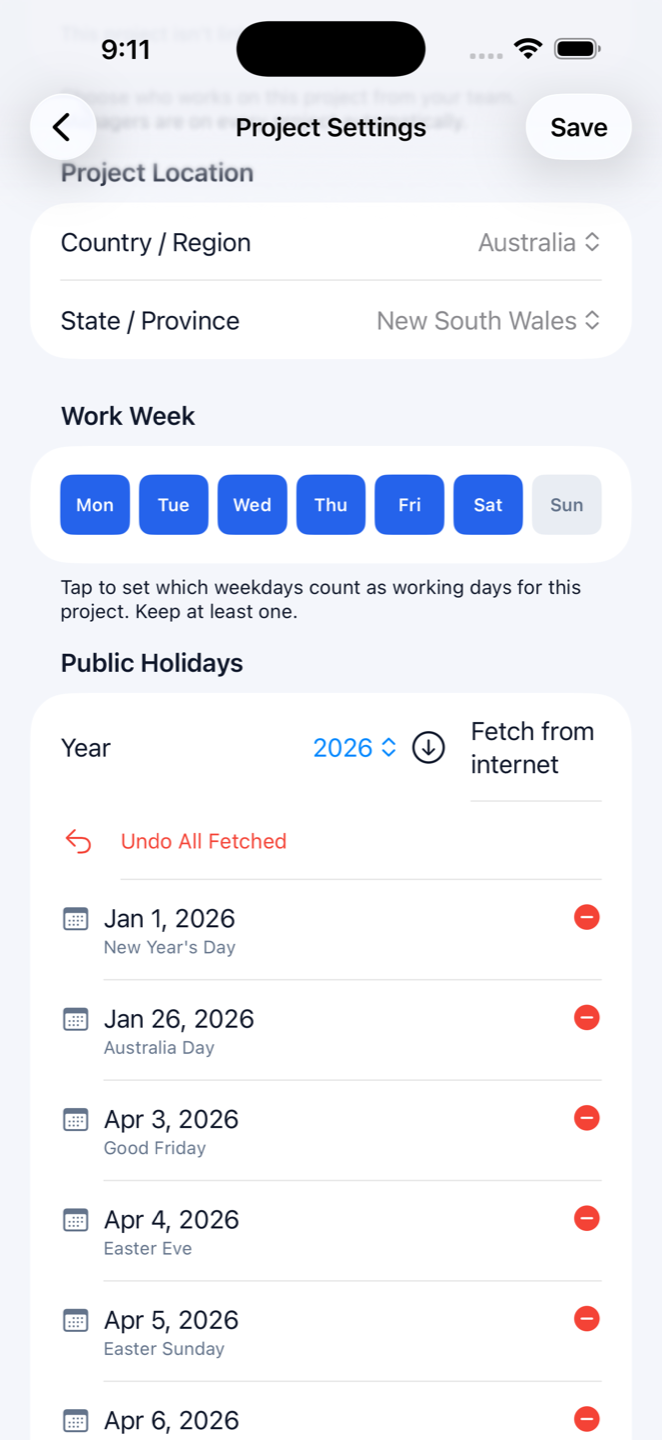
Pick the working week per project — five days, six, whatever the job runs. Choose your country and state and the app fetches this year's public holidays so the schedule plans around them; regions without coverage take custom holidays by hand. Language in English or Simplified Chinese, dates in Australian, Chinese, US or system format, light or dark appearance.
The storage screen shows your plan and exactly what photos, videos and projects are using; deleting frees space instantly. New to the app? Load the built-in sample project — a fully populated house build that costs no quota — and try every feature before you touch a real job.